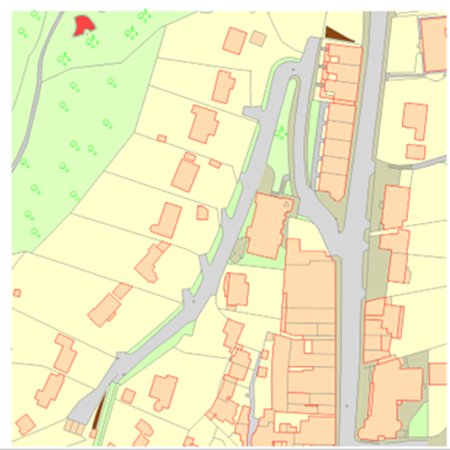
If you’ve ever worked with CAD data alongside Ordnance Survey (OS) mapping, you’ll know that clarity and consistency are key. Designers, planners and engineers often need to overlay their technical drawings with base mapping that looks and feels like the trusted OS outputs. Until now, achieving that same rich topographic appearance inside CAD has often meant time consuming manual work, layering or switching between platforms.
That’s why we’re excited to announce an enhancement to CentremapsLive CAD output, our Colour CAD Fill, a new feature that replicates the familiar topographic colours and symbology of Ordnance Survey users enjoy in PDF and GIS views, but directly inside your CAD environment.
Why Colour Matters in Mapping
Maps are more than just data, they are a visual language. OS has spent decades refining the colour palette and symbols used in its maps, ensuring that users can intuitively understand terrain, land use and man made features at a glance.
Think about the muted greens that differentiate parks from farmland, the subtle blues for waterways or the earthy tones that pick out woodland. These aren’t arbitrary design choices, they help surveyors, planners and contractors interpret maps instantly, without second-guessing what they are looking at.
However, until now, CAD downloads have often arrived in line-only formats. Useful, but lacking the visual depth and readability of OS topographic colour mapping. Users who wanted colour fills often had to manually edit layers, apply hatch patterns or cross-reference back to OS PDFs. This added extra steps to workflows that were already time-sensitive.
What is Colour CAD Fill?
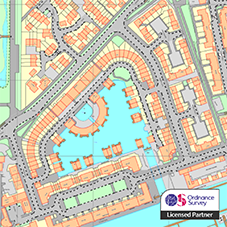
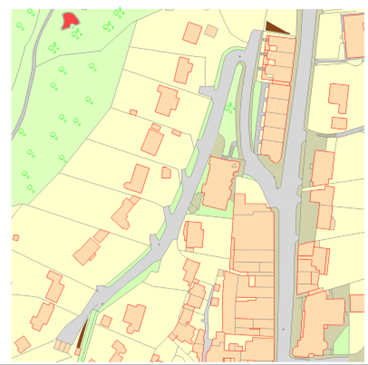
Colour CAD Fill is our solution to this challenge. When you order CAD data from CentremapsLive, you now have the option to receive files enhanced with pre-applied fills and symbols, that replicate the OS’s own PDF topographic style.
Here’s what that means in practice:
• Topographic Colour Matching: Land use types such as water, woodland, roads and buildings are rendered in the same colour palette used by OS in their official PDFs.
• Automatic Fills: No more manual hatching or layering. Grassland, woodland, lakes, rivers and other features are automatically filled.
• Recognisable Symbology: Standardised cartographic symbols for features like railways, paths and boundaries appear as you’d expect, ensuring visual consistency with other OS outputs.
• CAD-Ready Efficiency: Because the fills and symbols are baked into the file, you can open your CAD drawing and immediately begin overlaying your own designs, without the need for extensive pre-processing.
• Compact: Under the hood a lot of work has taken place to ensure this is delivered in minimal file sizes with linework and area fill easily separated in their own layers and no untidy symbol blocks left at 0,0.
In short, Colour CAD Fill brings the aesthetic and practical clarity of OS cartographic styling into the technical precision of CAD without compromising with bloated files.
Who Benefits?
The enhancement is designed with a wide range of users in mind:
• Urban Planners can present development proposals against a backdrop that clients and stakeholders instantly recognise.
• Architects can focus on design work rather than re-styling base maps to look professional.
• Engineers & Surveyors can work with mapping that communicates terrain and land use features clearly, reducing the risk of misinterpretation.
• Local Authorities & Utilities can produce reports and planning documents that carry the visual authority of OS-style maps, without extra design effort.
By eliminating the need for manual map styling, Colour CAD Fill helps streamline workflows, saving both time and resources.
How It Works in CentremapsLive
Please note, initially these orders will be available to order via the interface but generated offline, so rather than being downloadable in your customer order area, they will be emailed to you by the team. However, our aim is to make this fully available online in 2026.
Using Colour CAD Fill is simple:
1. Select Your Area: As usual, log into CentremapsLive and define your area of interest.
2. Choose CAD Output: Pick your preferred CAD Colour Fill format (DWG or DXF).
3. Download & Go: Open your file in CAD and start working with a map that already mirrors the OS PDF styling.
No additional software, plugins or post-processing steps are required.
Why This Enhancement Matters
At CentremapsLive, our mission has always been to make mapping data more accessible, usable and valuable for professionals. Colour CAD Fill is a direct response to user feedback, people told us they wanted the visual clarity of OS topographic mapping without having to sacrifice CAD flexibility.
By bridging the gap between OS cartographic standards and CAD design workflows, we’re helping to streamline projects from planning to delivery. It’s a small enhancement with a big impact on productivity, communication and accuracy.
Looking Ahead
We see Colour CAD Fill as part of a broader journey towards making mapping more integrated across platforms. As industries demand faster, clearer and more interoperable data, we’ll continue to invest our time and efforts in enhancements that make your everyday work smoother and more effective.
Keep your feedback coming, the changes we make will always be chosen by you.
Bringing Maps to Life: Introducing Colour CAD Fill in CentremapsLive
| E | info@centremaps.co.uk |
|---|---|
| W | Visit Centremaps Limited's website |
| Open Space, Leigh Sinton Road, Upper Interfields, Malvern, WR14 1UT |
Products by this Company